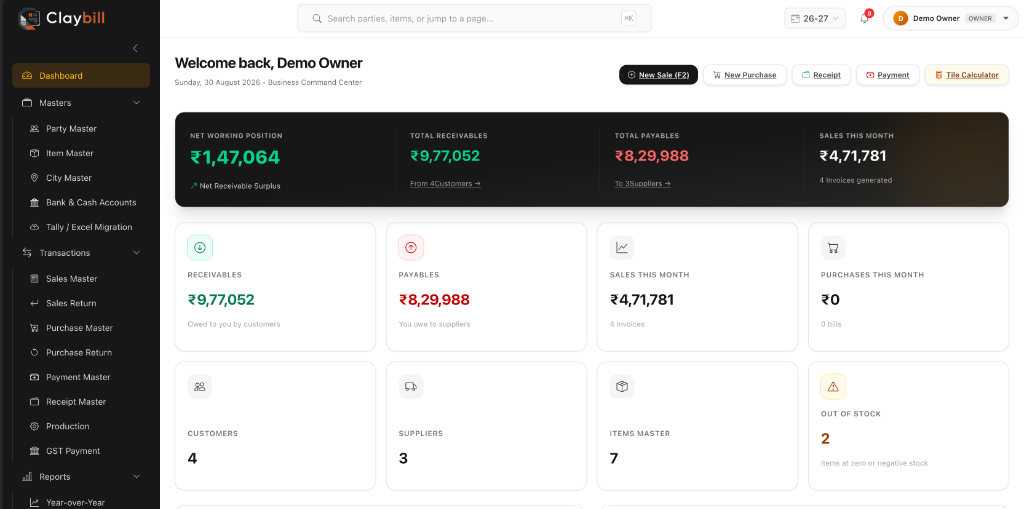
Most GST billing software is built for general retail or wholesale. Tile and ceramic trading has quirks that generic tools handle poorly. Here is a practical checklist for choosing software that actually fits your business.
- Choose billing software with tile-specific fields: Size, Grade, HSN and box, square foot and square metre handling.
- Look for correct GST treatment, e-way bill and e-invoice support, live stock and ledgers.
- Always trial with your own items and real invoices before committing.
- Ask about data security, backups and support before you switch.
Disclosure: we build ClayBill, a billing platform for this trade, so we have a point of view. The checklist below applies to any product you evaluate.
1. Tile-specific invoice fields
The same design often comes in several sizes and grades, so an invoice line needs more than a product name. Look for software that captures size, grade and HSN code on every line item, rather than forcing you to type them into a description field where they cannot be reported on.
2. Box, square foot and square metre handling
Tiles are bought and sold in boxes, priced per square foot or square metre, and quantities need converting between them. Check that the software converts automatically, so nobody is doing the arithmetic on a calculator.
3. Correct GST treatment
- SGST and CGST for local sales, IGST for inter-state sales.
- GSTIN and PAN stored against each customer and supplier.
- A proper tax-invoice print layout.
4. E-way bill and e-invoicing
If you dispatch goods regularly, generating e-way bills from the invoice saves repeated data entry. Businesses that fall under e-invoicing also need IRN generation. Rules change, so confirm current requirements on the official GST portal, and check that the software supports the workflow you need. See our e-way bill and e-invoice software page for how ClayBill approaches it.
5. Live stock across every movement
Purchases, sales, returns and production should all update one stock report. If stock is kept in a separate spreadsheet, it will drift away from your invoices. Read more about tile inventory and billing software.
6. Production tracking (if you manufacture)
If you consume raw material to produce finished tiles, look for production entries that update stock automatically.
7. Ledgers and outstanding
You should be able to see running balances, aging by party and printable statements without exporting to a spreadsheet.
Before you commit
Ask for a trial with your own items and a few real invoices. If entering a typical tile invoice feels like a workaround, the software was not built for your trade.
Questions to ask any vendor
- Can invoice lines hold Size, Grade and HSN as proper fields?
- Does it convert between boxes, square feet and square metres automatically?
- How does it handle SGST, CGST and IGST, and returns?
- Can I generate e-way bills and e-invoices from the invoice?
- Does stock update from purchases, sales, returns and production?
- Can I see party ledgers, aging and outstanding easily?
- How are my data, backups and user permissions handled?
Moving from registers and spreadsheets
Switching is easier than most traders expect if you plan it. Start by cleaning your item and party lists, then enter opening stock and outstanding balances, and run the old and new systems side by side for a short period. Train the people who create invoices first, because they use it most.
Data and security basics
Your billing data is sensitive. Ask where it is stored, whether each company's data is kept separate, how backups work and who can see what. Role-based access helps ensure staff only see what they need.
Common mistakes when adopting billing software
- Choosing a generic tool and forcing tile details into free-text fields.
- Skipping data clean-up, then carrying messy item and party lists into the new system.
- Training only the owner, not the people who create invoices every day.
- Switching on a busy month instead of a quieter period.
- Ignoring reports, so the system is used as a fancy invoice printer.
A one-week evaluation plan
- Day 1: set up your company, a few items with size, grade and HSN, and two or three parties.
- Day 2: enter a purchase and check the stock report.
- Day 3: create local and inter-state sales invoices and review the GST split.
- Day 4: try a sales return and a payment entry, then check the party ledger.
- Day 5: generate an e-way bill or e-invoice if you need them.
- Days 6-7: review reports and decide with your team.
Frequently asked questions
What should GST billing software for tile traders have?
Tile-specific invoice fields such as Size, Grade and HSN, box and area conversions, correct GST treatment, live stock, production tracking and party ledgers.
Can billing software generate e-way bills?
Some can. ClayBill generates e-way bills and e-invoices from the invoice you already created. Confirm current GST rules on the official portal.
How do I move from spreadsheets to billing software?
Clean your item and party lists, enter opening balances and stock, run both systems briefly in parallel and train invoice creators first.
Can I try ClayBill before switching?
Yes. You can set up your company at claybill.in with no credit card required.
See how ClayBill compares
ClayBill is our own GST billing and stock platform for tile and ceramic traders, live in production. Explore the GST billing software page, the full ClayBill overview, or start a free account at claybill.in.